 MakoMail
Windows desktop app
One inbox for every mailbox.
Microsoft 365, shared mailboxes, iCloud and Gmail — in one list, on your own machine. Everything Outlook does, without making you open six windows to do it.
Windows 10 or 11, 64-bit. Installs for you alone — no administrator rights needed.
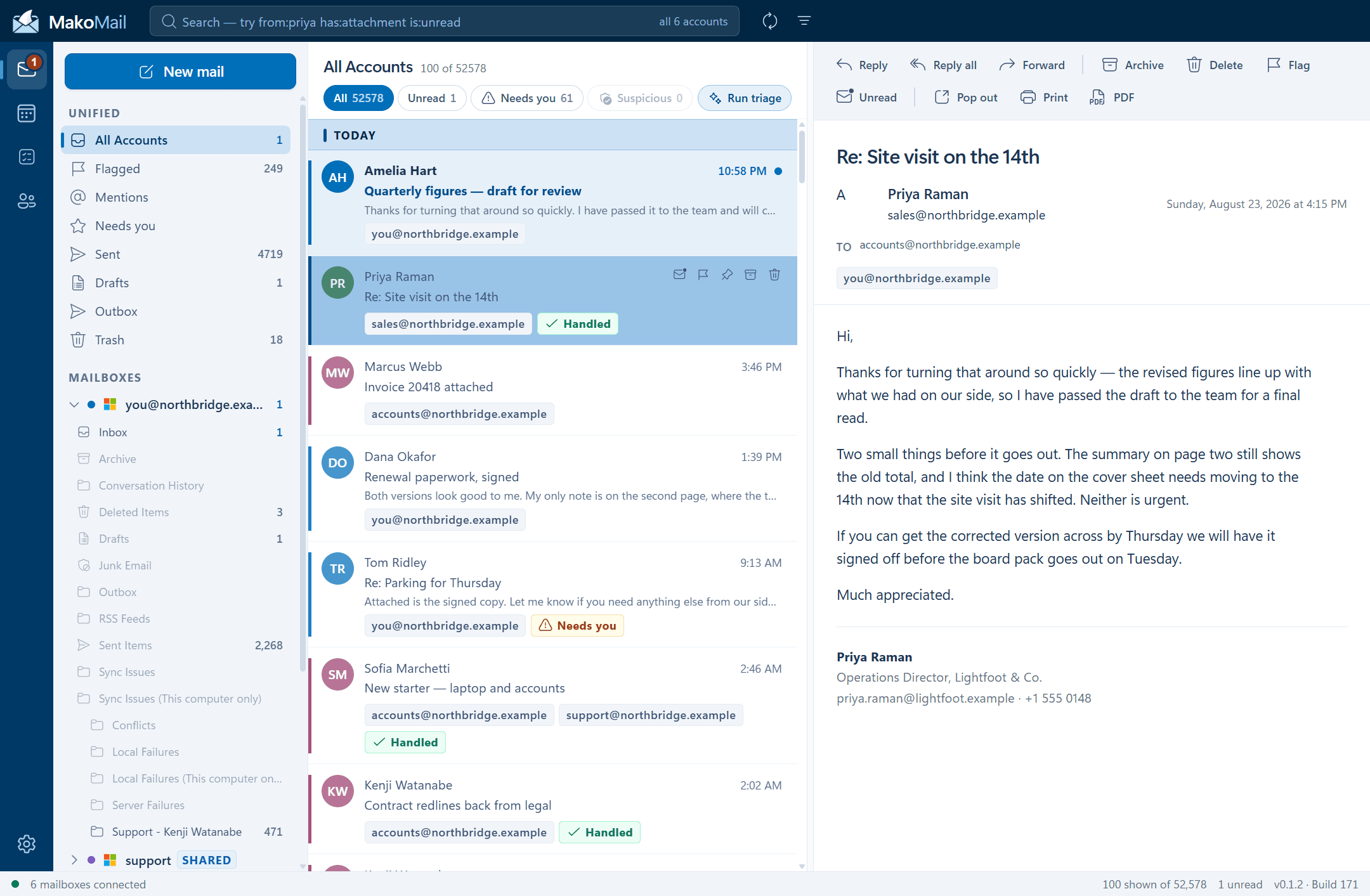
One inbox
Six mailboxes. One list.
Every account in one place, sorted by when things arrived rather than by which provider they came from. A thin colour key on each row tells you which mailbox it landed in, and the account it will reply from is on the row too — so a unified inbox never becomes a reply from the wrong address.
- Microsoft 365 and Exchange Online, including shared mailboxes
- iCloud, Gmail, Fastmail and Yahoo, with presets
- Any other IMAP server, entered by hand
- Per-account signatures, with a separate one for replies
Search
Every mailbox at once, answered locally.
Type "invoice" and three hundred hits come back. What makes a search a search is being able to say WHICH invoice — so the syntax is the one you already know from Gmail and Outlook, because the worst possible choice would be a third dialect.
from:priyato:accountssubject:renewal
has:attachmentis:unreadis:flaggedis:overdue
after:2026-08-01before:yesterdayin:sent
category:client"exact phrase"
Answered from the copy on your machine, so it reaches mail far older than the server keeps loaded — and it still works with the network off. An operator it does not recognise falls through to plain text rather than returning nothing and looking broken.
Triage
It can tell you what actually needs you.
Optional, and off until you turn it on. New mail is read and marked one of three ways, so the things genuinely waiting on you are not buried under receipts and newsletters.
A receipt, a confirmation, a notification. Nothing is being asked of you.
A question, a deadline, an approval. Somebody is waiting.
Reads like a phish or a pressure tactic. Worth a second look before you click.
Parity
The things you would miss.
A replacement is only a replacement if it does the unglamorous parts too. These are built and working, not on a roadmap.
- Conversation threading across accounts
- Rules that run before you read anything
- Categories and colour flags
- Quick steps — several actions on one click
- Snooze, and it comes back
- Scheduled send, and an outbox you can undo
- Read receipts, asked and answered on request
- Out of office, set from inside the app
- Pop out a message into its own window
- Print, or save as PDF
- View the original source of any message
- Import and export mbox and eml
Not only mail
Calendar, contacts and tasks, in the same window.
The other three things you keep a second app open for. Multiple calendars overlay in one view, meeting rooms can be booked as resources rather than invited as people who never reply, and a scheduling assistant shows when everyone is actually free.
- Calendars from every connected account, overlaid
- Contacts, including everyone your mailbox already knows
- Tasks from Microsoft To Do
- Free/busy and room booking for meetings
Where your mail lives
On your computer. Not ours.
MakoMail is not a mail host and not a relay. It connects to accounts you already have, and the copy it keeps is on your own machine. Nothing is uploaded to Mako Logics, because there is nowhere for it to go.
- Passwords and tokens encrypted by Windows itself, never in plain text
- Remote images blocked until you ask for them, so a tracking pixel does not report that you opened it
- Message content rendered isolated from the app, so a hostile email cannot reach your accounts
- Attachments marked as coming from the internet, so Office opens them in Protected View
- Signed as Mako Logics LLC, so Windows can tell you who built what you are running
The details
What you are installing.
| Platform | Windows 10 and Windows 11, 64-bit |
|---|---|
| Install | Per-user — no administrator rights required |
| Accounts | Microsoft 365, Exchange Online, shared mailboxes, iCloud, Gmail, Fastmail, Yahoo, any IMAP |
| Sending | Microsoft Graph, or SMTP for IMAP accounts |
| Storage | A local database in your own user folder |
| Signing | Signed as Mako Logics LLC via Azure Trusted Signing, and timestamped |
| Updates | Automatic, in the background, installed when you say so |
Questions
The things worth asking first.
Does it replace Outlook, or sit alongside it?
Either. It connects to the same accounts over the same protocols, so nothing changes on the server and you can run both while you decide. Mail read in one shows as read in the other.
What happens to my mail if I stop using it?
Nothing. Your mail lives with your provider — MakoMail keeps a local copy for speed and search. Uninstalling leaves the accounts exactly as they were, and the local store is deliberately not deleted on uninstall in case it holds imported mail that exists nowhere else.
Is the AI triage required?
No. It is off until you switch it on, and the app is fully usable without it. When it is on, only new unread mail is graded — mail you have already read has been triaged by the person who read it.
Does my mail get sent to an AI company?
Only if you turn triage on, and then only the parts needed to grade a message. With triage off, no message content leaves your machine for any reason.
Is the download signed?
Yes. The installer and the application are both signed as Mako Logics LLC through Azure Trusted Signing, and the signature is timestamped so it stays valid for the life of the download. You can check it yourself: right-click the installer, Properties, Digital Signatures. Windows may still show a caution the first few times while a new signature builds reputation — that is SmartScreen counting downloads, not a problem with the file.
How do updates work?
It checks twice a day and downloads in the background. It never installs on its own — it waits for you to press Restart, or slips in the next time you close the app normally.
Is there a Mac version?
Not today. It is a Windows app, built to sit beside Office on Windows 10 and 11.
What does it cost?
Nothing at the moment. It is built and maintained by Mako Logics, and there is no account to create and no subscription to cancel.
Put every mailbox in one window.
Free, no account to create, and it keeps itself up to date.
Signed by Mako Logics LLC. Windows 10 or 11, 64-bit.